
MyChart
Epic Systems CorporationMedical
4.4125.59K Reviews
- Version
- 11.9.3
- Installs
- 10.00M
- Age Rating
- Everyone
Screenshots
Our Review of MyChart
 Analysis by Appyee
If you're anything like me, juggling appointments, prescriptions, and health records feels like trying to keep a dozen spinning plates in the air. Enter MyChart, the app that's about to become your new best friend in the world of electronic health records. Whether you’re managing your own health or keeping tabs on your family’s health journeys, this app is a game-changer.
One place to check the details that matter
The most useful idea behind this medical app is putting health information and routine tasks in one place. I find that kind of access most valuable when I need to check a detail quickly rather than reconstruct it from paper, old messages, or memory. A medication list, a result, or an upcoming appointment can be easier to locate when it sits alongside the rest of a patient’s records.
That convenience has a practical limit: MyChart is a portal into care, not a substitute for a clinician or an urgent-care service. I would use it to review information and handle ordinary follow-up, but not to decide on my own that a worrying symptom can wait. The distinction matters because a tidy screen can feel reassuring without answering every medical question.
Your Health at a Glance
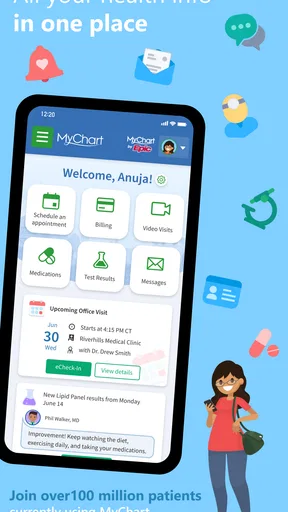
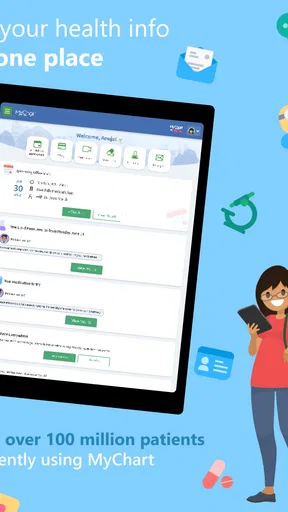
So, what does MyChart actually do? In short, it’s your personal health dashboard. You know those patient portals we’ve all wrestled with? This app puts all that info in your pocket. From lab results and immunizations to medications and appointment schedules, MyChart makes it all accessible with a few taps. No more frantic searches for that one report or trying to remember when your last check-up was.
Making a record useful, not just available
Having information on a phone is only helpful if I can make sense of it at the moment I need it. A practical habit is to open the relevant record before calling a clinic or attending an appointment, then note what I still need to ask. That turns the app into preparation rather than a source of rushed conclusions. If a result is unfamiliar, I would treat it as a prompt for a conversation with the care team, not as a diagnosis by itself.
It also helps to think of the dashboard as a reference point, not a guarantee that every part of a person’s care will appear in one view. MyChart is made by Epic Systems Corporation, and its usefulness in everyday life depends on whether the healthcare organization a person uses works with it. Before relying on it as the single place to manage care, I’d check whether the providers and records I need are actually available through my account.
The Appointment Whisperer
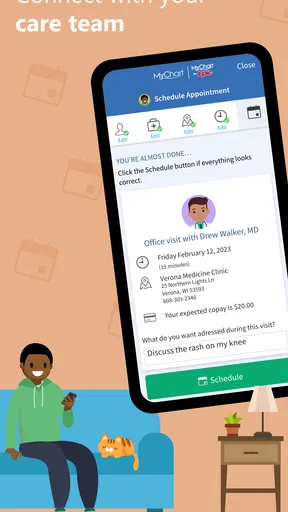
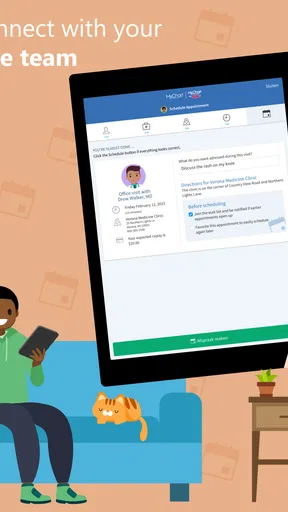
One of my favorite features is the ability to schedule appointments directly through the app. Need to see your doctor? Just pick a time that works for you, and you’re good to go. Plus, you can set reminders so you’ll never miss an appointment again. It’s like having a personal assistant, minus the cost.
When scheduling on a phone helps most
The appointment flow is particularly handy for a routine visit when I already know what kind of care I need and can choose from the options presented. For example, if I realize after work that a check-up needs arranging, I can look at scheduling without having to make a call during office hours. I’d still read the appointment details carefully: a convenient slot is not automatically the right type of visit, and questions about symptoms or urgency are better handled through an appropriate clinical channel.
For people who prefer speaking to a person, the app does not make the phone irrelevant. A call can be better when the reason for the visit is complicated, when the available appointment choices do not fit, or when I need help deciding which kind of appointment to book. I see the app as a useful route for straightforward tasks, not a rule that every interaction should move onto a screen.
Stay in the Loop
Ever wish you had a direct line to your doctor? MyChart's messaging feature makes this a reality. You can send non-urgent messages to your healthcare provider, ask questions, or request prescription refills. It’s super convenient and saves time compared to playing phone tag with the office.
Using messages with clear expectations
I’d make a message specific and easy to answer: explain what I’m asking, include the relevant context, and separate a refill request from a new medical concern. That can make a back-and-forth less likely. Messaging is best for something that can wait for a reply; it is not the route I would choose for a severe or rapidly changing problem. When timing matters, contacting a clinic directly or seeking urgent help is the safer choice.
There is also a useful trade-off between convenience and immediacy. A message avoids waiting on the phone, but it should not be treated like a live conversation. If I need an answer before making a decision that day, I would use a channel designed for timely help rather than repeatedly checking the app. That simple distinction helps keep digital convenience from creating false confidence.
Family Matters
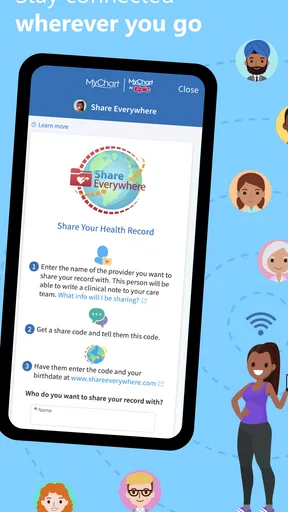
Managing family health can be a hassle, but MyChart lets you access your family members’ records (with their permission, of course). It’s perfect for keeping track of your kids’ vaccinations or checking in on your parents’ health. It’s all about peace of mind, right?
A calmer way to coordinate care
For a parent or caregiver, the benefit is less about looking at records all day and more about having relevant details ready when they are needed. Before a child’s visit, for instance, checking the information already available can help me arrive with a focused question instead of trying to remember everything in the waiting room. With an older relative, access can make coordination easier when they have agreed to share it. I would still make sure the person whose care is involved remains part of decisions wherever possible.
Family access also calls for care with privacy and account habits. I would avoid treating another person’s health information as a general family document, and I’d keep shared access limited to people who genuinely need it. The convenience is real, but it works best when everyone understands who can see what and uses that access respectfully.
Security You Can Trust
Now, I know what some of you might be thinking: "How safe is it?" Well, MyChart takes security seriously. They use top-notch encryption to keep your information private. You can also set up login credentials and even use biometric authentication if your phone supports it. Rest easy knowing your data is in safe hands.
Everyday habits that make the app easier to rely on
I’d make signing in part of a deliberate routine: use a screen lock, avoid leaving a health account open on a shared device, and take a moment to check the recipient before sending a message. Those are small steps, but medical records deserve the same attention I would give to banking or other sensitive information. Biometric sign-in can make access less cumbersome on a supported phone, while a memorable password and sensible device security remain worthwhile.
A realistic use case is preparing for a follow-up visit after a lab test. I can check the record when it is convenient, write down what I do not understand, and use a non-urgent message for a brief clarification if that is appropriate. Then I can bring the unresolved questions to the appointment. The app helps organize the process, but the conversation with a health professional is still where interpretation and decisions belong.
How it compares with the usual alternatives
Compared with paper folders, MyChart is easier to consult when I am away from home and less dependent on remembering which envelope contains a particular detail. Compared with calling an office for every routine request, its digital options can reduce phone tag. But a paper copy can still be useful for someone who prefers offline records, and a phone call is often better for a nuanced question or a situation that needs a prompt response. I would use the method that fits the task rather than expecting one app to replace every route to care.
It is also different from a general health-tracking app. A tracker may help someone record habits or symptoms, while a patient portal is most useful for interacting with information and services connected to healthcare. If what I want is a personal log that works independently of a provider, another kind of app may suit me better. If I want to check care-related records and handle practical follow-up, MyChart is the more relevant tool—provided my healthcare organization supports it.
Who will get the most from it
I’d recommend it most to people who already receive care through organizations that use MyChart and who want a convenient way to review records, manage routine appointments, or communicate about non-urgent matters. It can also suit caregivers who have authorized access and need to keep practical details close at hand. The app is free, rated for Everyone, and its current version is 11.6.3 for devices running Android 11 or later. It has a 4.5 average from around 254,000 ratings, with more than 10 million installs.
On the other hand, someone whose providers do not use MyChart may find it less useful than a direct phone call or the portal their clinic already offers. It is also not ideal for people who want a stand-alone medical encyclopedia, a symptom diagnosis tool, or guaranteed immediate answers. Those expectations do not match the role I would give this app: it is a practical companion for managing parts of an existing care relationship.
In conclusion, MyChart is a must-have for anyone looking to simplify their healthcare management. It’s intuitive, packed with features, and puts you in control of your health information. So why not give it a try? Your future self will thank you!
Privacy and Permissions
See what permissions an app requests and how it handles your data.
- Location
- approximate location (network-based), precise location (GPS and network-based)
- Phone
- directly call phone numbers
- Photos/Media/Files
- read the contents of your USB storage, modify or delete the contents of your USB storage
- Storage
- read the contents of your USB storage, modify or delete the contents of your USB storage
- Camera
- take pictures and videos
- Microphone
- record audio
- Other
- view network connections, pair with Bluetooth devices, access Bluetooth settings, full network access, change your audio settings, run at startup, control vibration, prevent device from sleeping
Verdict
Strengths of MyChart
- User-friendly interface for easy navigation.
- Secure access to personal health records.
- Appointment scheduling with reminders.
- Integration with multiple healthcare providers.
- Real-time updates on test results.
Limitations of MyChart
- Limited features without provider support.
- Occasional syncing issues with devices.
- Notifications can be overwhelming.
- Requires stable internet connection.
- Privacy concerns with sensitive data storage.
Similar Picks in This Category
View All
WebMD: Symptom Checker
WebMD, LLC4.1

Microphone Amplifier
DOSA Apps4.2

Anatomy Learning - 3D Anatomy
3D Medical OU4.5

Period Tracker and Calendar
SimpleInnovation4.9

GoodRx: Prescription Coupons
GoodRx4.8

CVS Health
CVS Pharmacy4.5
Frequently Asked Questions
What is MyChart and how does it work?
MyChart is a comprehensive health app designed to provide patients with easy access to their medical records and communication with healthcare providers. It allows users to view test results, schedule appointments, and manage medications. The app integrates with healthcare systems to ensure users have up-to-date information and can engage in their healthcare from anywhere.
Is MyChart secure to use for managing my health information?
Yes, MyChart prioritizes user privacy and security by employing advanced encryption methods to protect sensitive health data. The app complies with regulations such as HIPAA, ensuring that your personal health information remains confidential. Users should ensure they use secure passwords and keep their login details private to enhance security.
Can I access MyChart on multiple devices?
Yes, MyChart is accessible on multiple devices, including smartphones, tablets, and computers. Users can download the app on iOS and Android devices or access it via a web browser. Synchronization across devices ensures that you have seamless access to your health information, appointments, and communications with healthcare providers.
What features does MyChart offer to help manage my healthcare?
MyChart offers a variety of features such as viewing test results, managing prescriptions, scheduling appointments, and messaging healthcare providers directly. It also provides notifications for upcoming appointments and medication reminders, making it easier for users to stay on top of their health management. Integration with wearable devices is also available for tracking health metrics.
Do I need to have a specific healthcare provider to use MyChart?
To use MyChart effectively, your healthcare provider must be part of a participating health system that supports the app. Many major healthcare organizations offer MyChart access, but it’s essential to check with your provider to ensure compatibility. Once set up, you can connect with your provider’s services through the app seamlessly.
